
Get Your FREE Microsoft Project Quick Access Toolbar
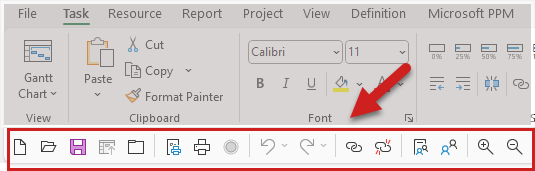
The Quick Access Toolbar in Microsoft Project is a user-friendly feature that enhances productivity by reducing the number of clicks needed to execute common tasks. You can easily add or remove buttons for functions like “New Project,” “Print,” “Link the Selected Tasks,” “Zoom In,” “Scroll to Task,” and many more. Customization is simple; you can either right-click on a command from the Ribbon and choose “Add to Quick Access Toolbar,” or you can go to the toolbar’s drop-down menu to select more commands to add.
This allows you to tailor the toolbar to fit your specific project management needs, making it a powerful tool for speeding up scheduling, status updates, and other routine tasks. Check out my video for how to install and use a customized Ribbon and Quick Access Toolbar.
To help you get started, enter your email address, and I’ll will send you a link to download a customization file containing a customized Ribbon and Quick Access Toolbar package that we’ve created specifically to speed up your scheduling and status updates in Microsoft Project.
Download Your Free Quick Access Toolbar Below
Send download link to: